01
Usability deficit
AACOG's System Usability Scale score was 21.25 compared with LIDDA's 70.42, indicating a severe usability gap.
Usability, accessibility, and competitive research translated a severe service-navigation problem into strategic recommendations for a clearer digital experience.
The Alamo Area Council of Governments (AACOG) operates an Intellectual & Developmental Disability (IDD) Services division dedicated to helping individuals with disabilities find stable employment. Historically, the agency faced severe operational bottlenecks, taking up to 12 months to process member applications. This delay was heavily exacerbated by a massive volume of support calls from prospective applicants seeking basic information, which overwhelmed intake caseworkers and crushed productivity. Leadership set an aggressive target to slash this processing backlog down to 6 months.
Partnering directly with the IDD Services leadership team, my research team launched a comprehensive usability and accessibility audit of the agency’s web platform. The strategic goal was to identify critical user friction points, optimize self-service information discovery, and improve digital accessibility. By designing a clearer web experience, we aimed to drive digital call deflection—eliminating redundant support inquiries so caseworkers could focus more of their time on application processing.
We evaluated platforms across five core usability dimensions, discovering that the primary agency website suffered from significant layout violations:
Outcome: We chose Dallas's IDD services site (LIDDA) because it had the fewest heuristic violations compared with the other competitor sites reviewed.
Moderated Usability Testing: Conducted 6 semi-structured interviews utilizing the concurrent think-aloud method to capture real-time user frustrations. We deployed a dual-moderator model to maximize data collection.
Post-test, participants completed the System Usability Scale (SUS) to give us a standardized metric for comparison. This revealed a staggering usability gap: AACOG scored 21.25, compared with the competitor’s 70.42.
AACOG's System Usability Scale score was 21.25 compared with LIDDA's 70.42, indicating a severe usability gap.
While users located the homepage at similar speeds on both sites, AACOG users stalled significantly or failed entirely on complex workflows like finding intake and enrollment information.
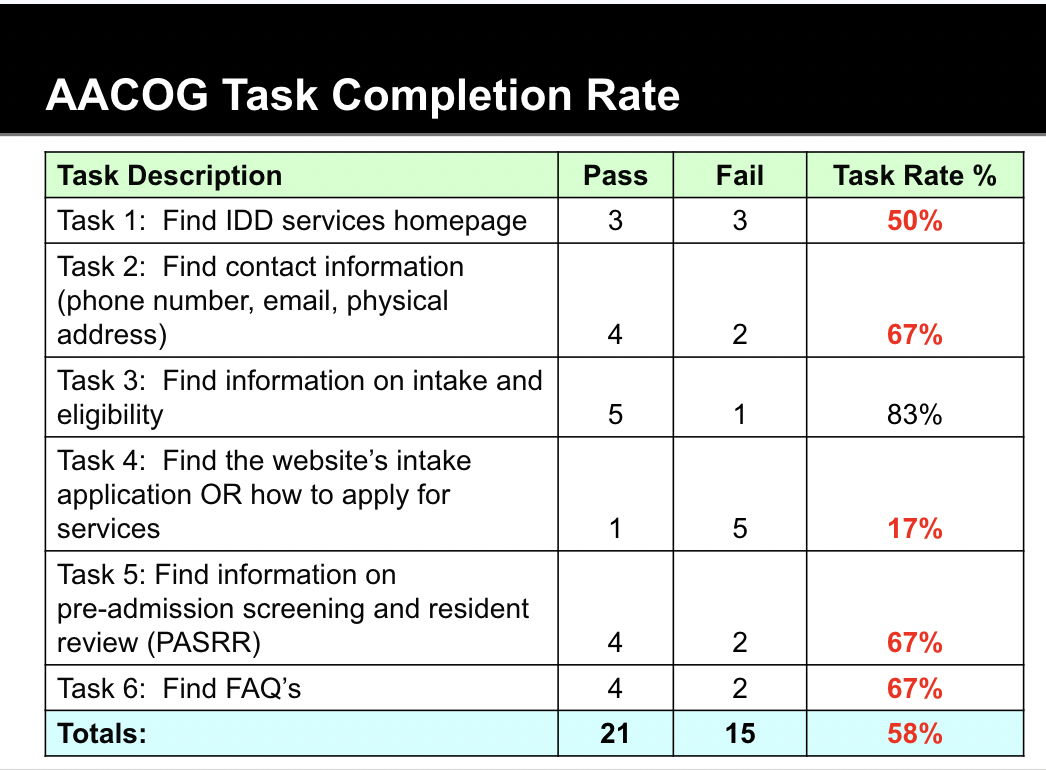
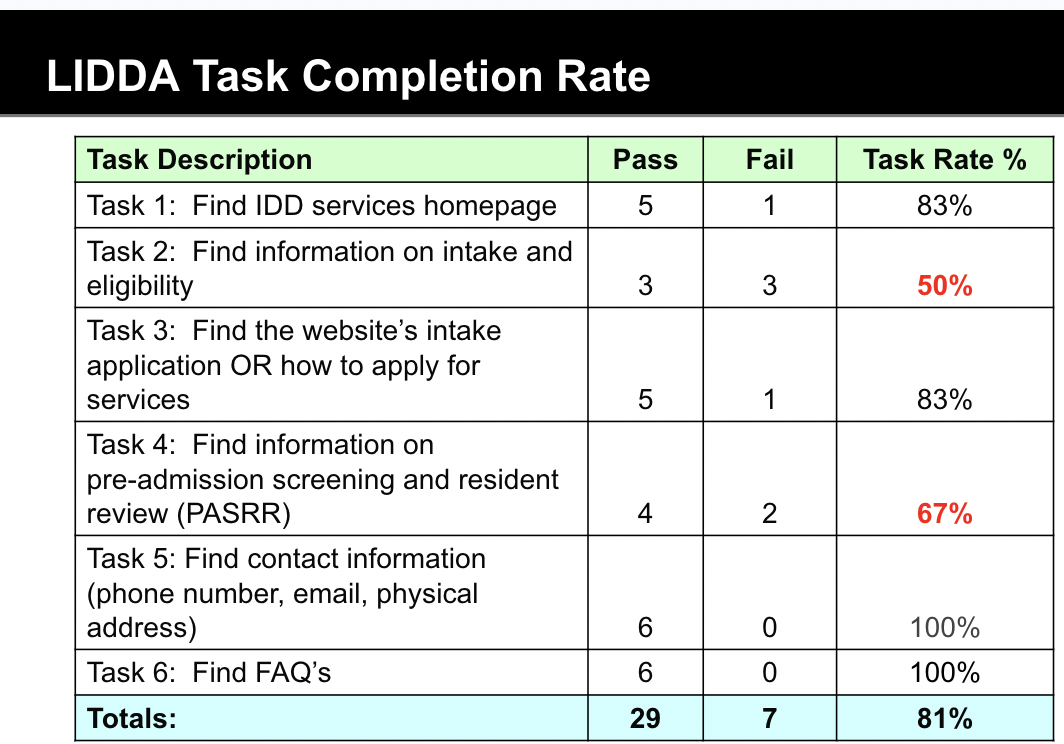
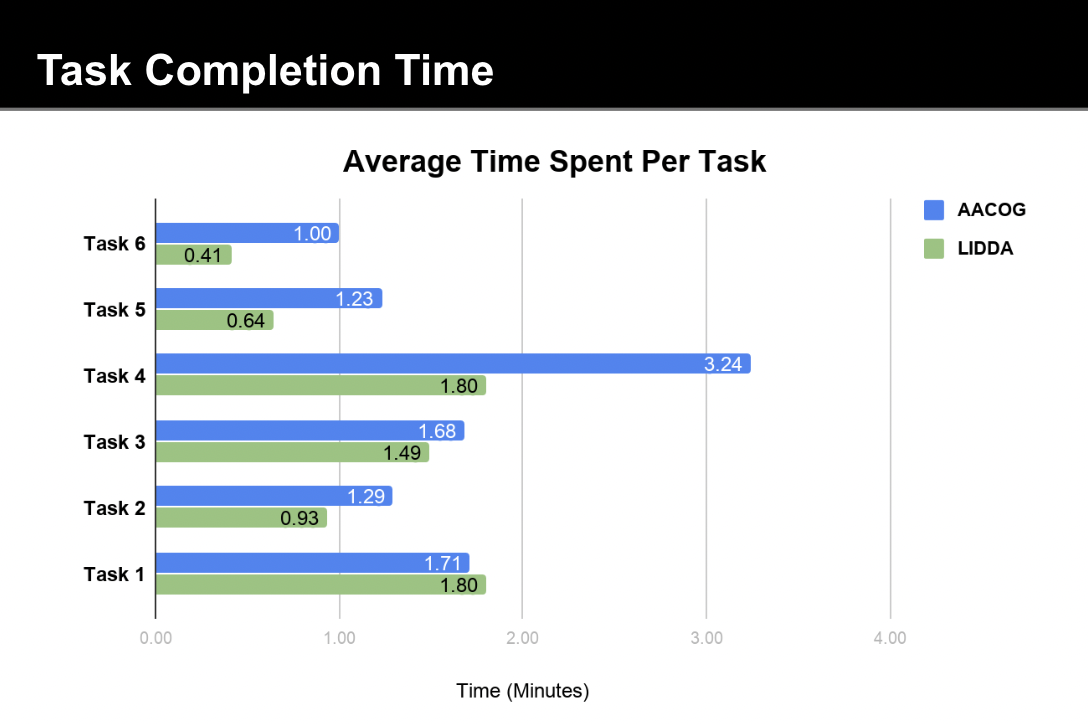
The quantitative metrics were mirrored by intense qualitative frustration. Users felt penalized by AACOG's confusing information architecture and dense layout.
“Makes me feel like an idiot.”
“If I were trying to apply for services, I would not know where to begin.”
“Nothing is presented in a logical manner, everything is hidden behind arbitrary walls.”
“I didn't feel like I was going around in circles the whole time.”
“Everything was where it should be.”
“This website was much better, and [the information was] easier to find.”
Conduct a card sorting test to align navigation with user mental models and improve important tasks like finding the IDD Services homepage and determining eligibility.
Using this study as a baseline, track user activity to understand behaviors and make improvements.
Standardize monochromatic iconography and increase font scale to improve scannability and reduce cognitive load.
Instead of having a link to the brochure in a nested page, redistribute information across the site for enhanced comprehension and a cleaner design.
Developed strong project management foresight by successfully pivoting our participant recruitment strategy mid-project without losing momentum.
Proved the massive usability gap between the AACOG and LIDDA sites by pairing hard quantitative metrics with high-impact qualitative quotes.
Demonstrated foresight and communication to fortify adaptive, agile faculties within the project team.